How to Learn a New Word Every Day with Vocabulary Reminders and Notifications
Learn a new word every day
Free on iOS & Android

Set up Vocabulary reminders to get a new word at times you choose, see how Do you know quiz notifications work, and what is free versus premium.

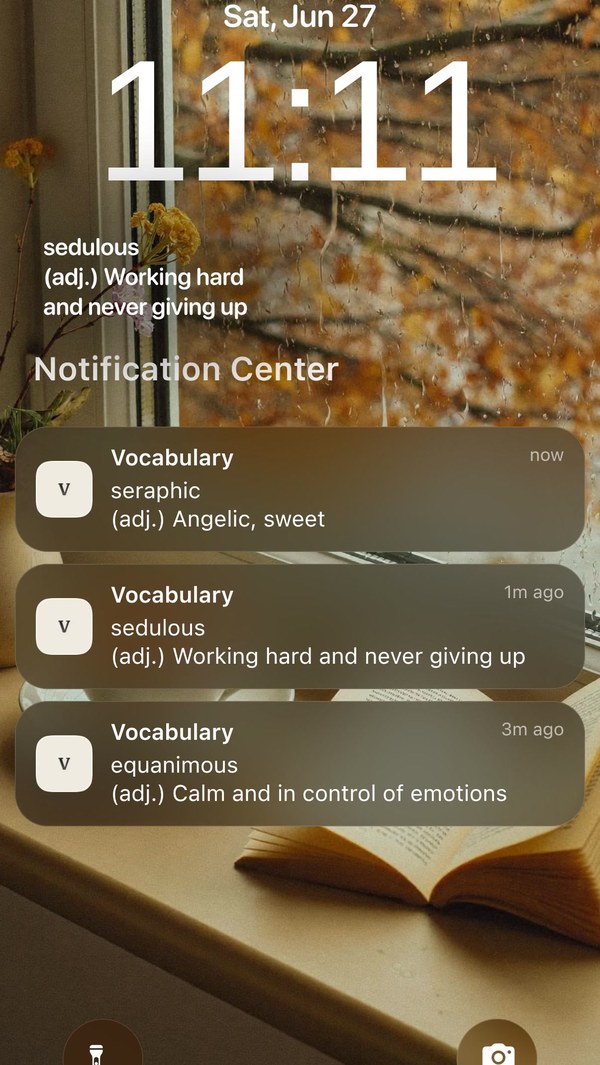
To learn a new word every day with reminders, open the Vocabulary app, go to your reminder settings from your Profile, and choose the times you want a word to arrive. Each reminder is a notification with a word and its meaning, so you learn without opening the app.
This guide covers setting your reminder times, what the Do you know notifications do, the quick actions you can use from a notification, and what is free. You need the free Vocabulary app on your iPhone or Android phone.
What does a Vocabulary reminder look like?
A content reminder is a notification with a word and a short definition, taken from the categories you choose. A new install starts with a default set of reminders spread over the weekday from 9 AM to 8 PM, so you receive words before you change anything. Custom reminders let you set your own times, how many a day, and which words.
A different kind of notification starts with Do you know… and turns the word into a one-word quiz. At most one of these arrives per day, and it is a synonym match or a meaning match.
Why reminders work for learning words
A word you meet a few times in different moments sticks better than a word you read once in a long list. A reminder gives you those repeat meetings without a study session. If you want a bigger daily routine, the 5-minute daily habit pairs well with reminders.
How to get a new word every day with reminders, step by step
1. Allow notifications for the Vocabulary app
When the app asks, allow notifications. If you said no earlier, turn them on for Vocabulary in your phone settings.
2. Open your reminder settings from your Profile
Your Profile links to the reminder settings, where you control when words arrive and which words you receive.
3. Pick the times that fit your day
Choose times when you can read a line without effort: the morning coffee, the commute, lunch. A handful of spread-out times works better than many close together.
4. Choose which words you receive
Select the categories you want. Words come from your chosen categories first; if there are not enough, they come from the full word list. Include the General category if you want the Do you know quiz notifications.
5. Use the quick actions on a notification
Press and hold a word notification to Favorite it, flag it with Want to memorize, hear it with Pronounce, open More info, save it as an image or share it.
6. Answer the Do you know notification
Tap it to open a one-word game, then pick the right synonym or meaning. When you finish or dismiss it, the app takes you to the main screen on the correct word.
7. Review your favorites at the weekend
Words you favorited or flagged are saved in the app, so once a week you can go through them in one sitting instead of chasing them across days.
Frequently asked questions
Are Vocabulary reminders free?
Basic reminders are part of the free app. Premium adds all categories and word details, which you can open from a word with examples, synonyms and etymology. Free reminder text is shortened to fit a notification; premium reminders show the full text.
How many reminders can I get per day?
You choose. The default set spreads several reminders across the weekday, and custom reminders let you set your own times and number. On iPhone the app schedules up to 58 content notifications ahead, so more reminders per day means fewer days scheduled in advance.
Why am I not getting Vocabulary notifications on Android?
Android battery optimization often blocks background notifications. Exclude the Vocabulary app from battery optimization in your phone settings, then check that notifications are allowed.
Can I turn off the Do you know quiz notifications?
They arrive only when the General category is included and at most once a day. Feature-related notifications follow your reminder settings, so you can turn them off there.
